GIT : Commit 없이 원격지 Pull & Merge 하는 방법
2026. 1. 14. 20:34
로컬 변경사항을 커밋하지 않고 원격 변경사항과 병합하려면 Stash를 사용해야 합니다.
추천 방법: Stash 사용
# 1. 현재 변경사항을 임시 저장 (커밋 없이)
git stash

# 2. Pull 실행
git pull origin develop

# 3. 임시 저장한 변경사항 다시 적용
git stash pop
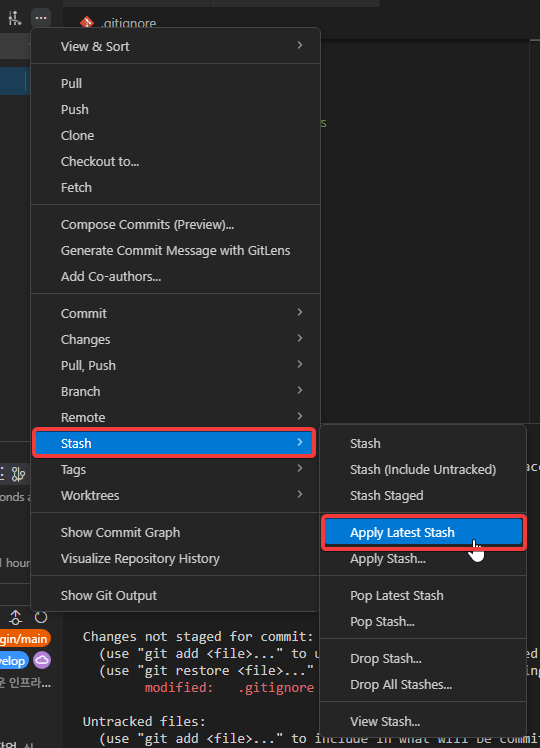
VS CODE 에서 하는 방법
... (More Actions) → Stash → Stash (Include Untracked)
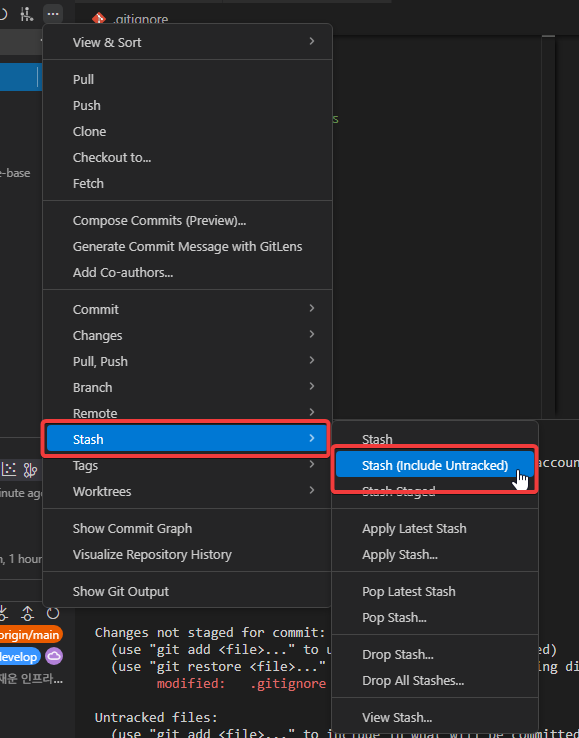
... → Pull


.... → Stash → Apply Latest Stash 또는 Pop Latest Stash
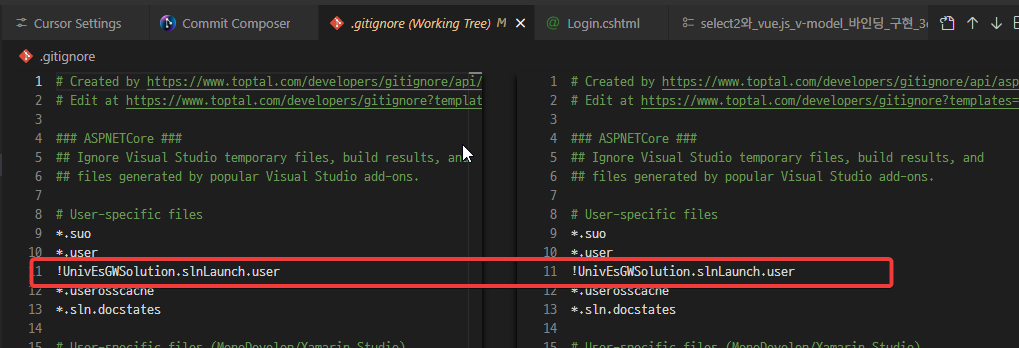
알아서 병합되어 있는것을 볼 수 있습니다.
보충 설명
상황 요약
git pull 명령 실행 시 아래와 같은 오류가 발생했습니다:
error: Your local changes to the following files would be overwritten by merge:
    .gitignore
Please commit your changes or stash them before you merge.
Aborting
→ 원인: 로컬에서 .gitignore 파일을 수정했는데, 원격 develop 브랜치에도 .gitignore 파일이 변경되어 있어 병합(merge) 시 충돌이 예상되기 때문에 Git이 안전장치로 pull을 중단한 것입니다.
목표: 최대한 빠르고 안전하게 원격 변경사항을 가져오고 싶으며, merge를 진행하고 싶다.
추천 해결 순서 (가장 일반적인 순서대로)
| 순번 | 방법 | 명령어 예시 | 언제 추천하는가? | 로컬 변경사항 운명 |
|---|---|---|---|---|
| 1 | Stash (가장 추천) | git stash push -m "WIP .gitignore"git pullgit stash pop |
로컬 변경을 잠시 보관하고 나중에 다시 적용하고 싶을 때 | 나중에 다시 적용 가능 |
| 2 | Commit 후 pull | git add .gitignoregit commit -m "Update .gitignore"git pull |
변경사항이 의미 있고 커밋할 가치가 있을 때 | 커밋으로 남음 (히스토리에 기록) |
| 3 | 원격 변경 강제 덮어쓰기 | git fetchgit reset --hard origin/develop |
로컬 .gitignore 변경을 완전히 버리고 싶을 때 | 로컬 변경 완전 삭제 |
| 4 | pull --rebase | git pull --rebase origin develop |
깔끔한 히스토리를 원할 때 (merge 대신 rebase) | 충돌 시 수동 해결 필요 |
1번 방법 - Stash 사용 (가장 안전하고 일반적인 선택)
# 1. 현재 변경사항을 임시 저장 (스태시)
git stash push -m "임시 .gitignore 변경사항"

# 2. 원격 브랜치 가져오기 (pull)
git pull origin develop

# 3. 필요하면 스태시 복원
git stash pop

# (선택) 복원 후 충돌이 발생하면 직접 수정 후 커밋
git add .gitignore
git commit -m "Merge conflict resolved in .gitignore"
장점
- 로컬 변경을 잃지 않음
- 가장 안전
- 나중에 변경사항을 다시 검토할 수 있음
2번 방법 - 바로 커밋하고 pull
git add .gitignore
git commit -m "로컬 .gitignore 업데이트"
git pull origin develop
→ 충돌이 발생하면 VS Code 등에서 충돌 해결 후 커밋
3번 방법 - 로컬 변경 완전히 포기하고 원격으로 덮어쓰기 (주의!)
# 원격 최신 상태 가져오기
git fetch origin

# 현재 브랜치(develop)를 원격 develop으로 강제 이동
git reset --hard origin/develop
⚠️ 경고: 이 방법은 로컬에서 수정한 .gitignore를 완전히 삭제합니다.
→ 정말 로컬 변경이 필요 없다고 판단될 때만 사용하세요.
추가 팁 (Visual Studio 환경)
- VS Git GUI 사용
- Team Explorer → Changes 탭
.gitignore파일 우클릭 → Stash 또는 Commit 선택 가능- Stash 후 Pull 버튼 클릭
- 충돌이 자주 발생한다면
.gitignore파일을 프로젝트 초기 설정 단계에서 확정하고, 이후에는 거의 수정하지 않는 것이 좋습니다.
(예:.vscode/폴더, 개인 설정 파일 등은.gitignore에 추가하고 추적하지 않도록)
요약 - 가장 추천하는 실행 순서
git stash push -m "develop pull 전 .gitignore 임시 저장"
git pull origin develop
git stash pop
# 필요하면 충돌 해결 후
git add .gitignore
git commit -m "충돌 해결: .gitignore"
'프로그래밍 > GIT' 카테고리의 다른 글
| Windows에서 Git 설치 및 GitHub 연동 가이드 (2026년 최신판) (0) | 2026.06.11 |
|---|---|
| Git Worktree: 개발자가 몰라서 손해보는 브랜치 동시 작업의 기술 (0) | 2026.05.18 |
| 윈도우에서 Git 설치 가이드 (2025년 최신) (4) | 2025.06.09 |
| GitHub Actions 의 cron 표현식 알아보기 (0) | 2024.10.22 |
| GitLab : ASP.NET CORE 8 - .gitlab-ci.yml 내부 설명 - CI/CD (0) | 2024.08.14 |