SERVER 관련/Windows 관련
windows 11 에서 windows 10 처럼 마우스 우클릭 및 탐색기 메뉴 변경하기
재우니
2021. 11. 25. 11:12
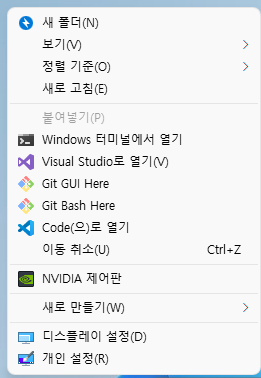
Windows 10 스타일의 우클릭 메뉴 사용하기
reg.exe add "HKCU\Software\Classes\CLSID\{86ca1aa0-34aa-4e8b-a509-50c905bae2a2}\InprocServer32" /f /ve
Windows 11 스타일의 우클릭 메뉴 복원하기
reg.exe delete "HKCU\Software\Classes\CLSID\{86ca1aa0-34aa-4e8b-a509-50c905bae2a2}" /f

Windows 10 스타일의 탐색기 상단 UI
reg.exe add "HKCU\Software\Classes\CLSID\{d93ed569-3b3e-4bff-8355-3c44f6a52bb5}\InprocServer32" /f /ve
Windows 11 스타일의 탐색기 상단 UI 복원하기
reg.exe delete "HKCU\Software\Classes\CLSID\{d93ed569-3b3e-4bff-8355-3c44f6a52bb5}" /f
참고 사이트
https://www.reddit.com/r/Windows11/comments/pu5aa3/howto_disable_new_context_menu_explorer_command/
How-To: Disable new context menu, Explorer command bar
No 3rd-party apps or patches or whatever, just a simple registry value. Restart Explorer shell to take effect. **Disable new context menu:** ...
www.reddit.com