ASP.NET 5.0 WEB API 에 OData 구축 적용해보기
www.youtube.com/watch?v=1oA6XxmYAA0
위의 유투브강좌를 보면서 구축한 내용이며, .NET 5 를 2020.12.28 일자 적용해 봤습니다.
설치는 아래와 같이 3개 정도 진행하였으며, 유투브 강좌보다 Microsoft.AspNetCore.OData 를 7.5.2 까지 올려서 적용하였습니다. 7.5.4 가 최신이긴 한데 오류가 발생되어 해당 버전으로 구축 하였습니다.
    <PackageReference Include="Microsoft.AspNetCore.Mvc.NewtonsoftJson" Version="5.0.1" />
    <PackageReference Include="Microsoft.AspNetCore.OData" Version="7.5.2" />
    <PackageReference Include="Newtonsoft.Json" Version="12.0.3" />
StudentsController 의 web api 생성
using Microsoft.AspNet.OData;
using Microsoft.AspNetCore.Http;
using Microsoft.AspNetCore.Mvc;
using ODataWithDotNet5Demo.Models;
using System;
using System.Collections.Generic;
using System.Linq;
using System.Threading.Tasks;

namespace ODataWithDotNet5Demo.Controllers
{
    [Route("api/[controller]")]
    [ApiController]
    public class StudentsController : ControllerBase
    {
        [HttpGet]
        [EnableQuery]
        public ActionResult<List<Student>> GetAllStudents()
        {
            return Ok(new List<Student>
            {
                new Student
                {
                    Id = Guid.NewGuid(),
                    Name = "Viral Bahen",
                    Grade = 100
                },
                new Student
                {
                    Id = Guid.NewGuid(),
                    Name = "Josh McCall",
                    Grade = 150
                },
                new Student
                {
                    Id = Guid.NewGuid(),
                    Name = "Kailu Hu",
                    Grade = 90
                }
            });
        }
    }
}
Student 모델
using System;
using System.Collections.Generic;
using System.Linq;
using System.Threading.Tasks;

namespace ODataWithDotNet5Demo.Models
{
    public class Student
    {
        public Guid Id { get; set; }
        public string Name { get; set; }
        public int Grade { get; set; }
    }
}
Startup.cs
// ** 추가된 부분 이라고 명시한 코드가 추가 또는 변경된 부분입니다.
using Microsoft.AspNetCore.Builder;
using Microsoft.AspNetCore.Hosting;
using Microsoft.AspNetCore.HttpsPolicy;
using Microsoft.AspNetCore.Mvc;
using Microsoft.Extensions.Configuration;
using Microsoft.Extensions.DependencyInjection;
using Microsoft.Extensions.Hosting;
using Microsoft.Extensions.Logging;
using Microsoft.OpenApi.Models;
using System;
using System.Collections.Generic;
using System.Linq;
using System.Threading.Tasks;
using Microsoft.AspNet.OData.Extensions;

namespace ODataWithDotNet5Demo
{
    public class Startup
    {
        public Startup(IConfiguration configuration)
        {
            Configuration = configuration;
        }

        public IConfiguration Configuration { get; }

        // This method gets called by the runtime. Use this method to add services to the container.
        public void ConfigureServices(IServiceCollection services)
        {
            services.AddControllers().AddNewtonsoftJson(); // ** 변경추가된 부분
            services.AddOData(); // ** 추가된 부분
            services.AddSwaggerGen(c =>
            {
                c.SwaggerDoc("v1", new OpenApiInfo { Title = "ODataWithDotNet5Demo", Version = "v1" });
            });
        }

        // This method gets called by the runtime. Use this method to configure the HTTP request pipeline.
        public void Configure(IApplicationBuilder app, IWebHostEnvironment env)
        {
            if (env.IsDevelopment())
            {
                app.UseDeveloperExceptionPage();
                app.UseSwagger();
                app.UseSwaggerUI(c => c.SwaggerEndpoint("/swagger/v1/swagger.json", "ODataWithDotNet5Demo v1"));
            }

            app.UseHttpsRedirection();

            app.UseRouting();

            app.UseAuthorization();

            app.UseEndpoints(endpoints =>
            {
                endpoints.EnableDependencyInjection(); // ** 추가된 부분
                endpoints.Select().Filter().Expand(); // ** 추가된 부분
                endpoints.MapControllers();
            });
        }
    }
}
실행한 결과
전체 조회
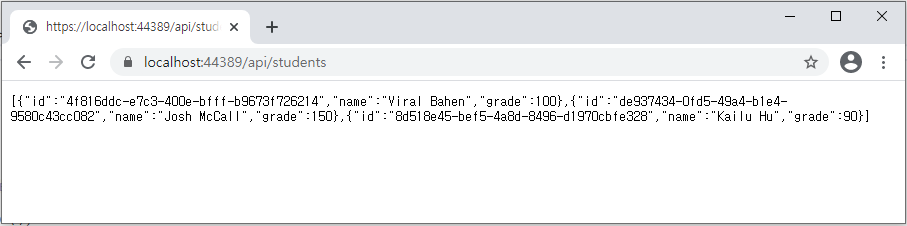
이름 필드값들만 반환받기

grade 필드 값 중에 110 보다 작은 데이터 가져오기

name 필드 값 중에 Viral Bahen 인 데이터 가져오기
문자열이므로 $filter=필드명 eq 'Viral Bahen' 처럼 홀따옴표 기재해 주어야 함

더 많은 구문은.. 아래 msdn 을 참고하시면 되겠습니다.
docs.microsoft.com/ko-kr/azure/search/query-odata-filter-orderby-syntax
OData 언어 개요 - Azure Cognitive Search
Azure Cognitive Search 쿼리에 대 한 필터, 선택 및 정렬에 대 한 OData 언어 개요입니다.
docs.microsoft.com
aspdotnet.tistory.com/2395?category=895257
ASP.NET Core OData Part 1 (blog. Ricardo Peres)
weblogs.asp.net/ricardoperes/asp-net-core-odata-part-1 ASP.NET Core OData Part 1 weblogs.asp.net weblogs.asp.net/ricardoperes/asp-net-core-odata-part-2 ASP.NET Core OData Part 2 weblogs.asp.net webl..
aspdotnet.tistory.com